From Chaos to Clarity: Standardising MLOps and Lessons Learned
How we standardised AI research, reduced onboarding time by 92%, and cut cloud costs by $6,000/month—plus hard-won lessons from 7+ years in production AI.
After 7+ years of productising AI models, I've learned that getting a model to work in a notebook is maybe 10% of the job. This blog shares a real case study from my time at Cinnamon AI, where I led the transformation of our MLOps infrastructure—plus the lessons I wish I knew earlier.
The Problem: "Works on My Machine" Syndrome
"Works on My Machine", image credit: https://www.reddit.com/r/ProgrammerHumor/comments/y8qylu/dockerisborn/
At Cinnamon AI in 2019-2020, our research team was growing fast, but our infrastructure wasn't keeping up. We faced a classic "Reproducibility Crisis" where brilliant models were trapped in personal laptops. This wasn't just a technical problem—it was a morale issue. Researchers were stressed about basic reliability, and onboarding a new engineer was a multi-day configuration nightmare.
Our environment was fragmented:
- Scattered Setups: Each researcher had a personal training environment with different Python versions and dependencies.
- The "Black Box" of Training: Past experiments were nearly impossible to reproduce. Hyperparameters were lost, and there was no clear lineage between experiments and deployed models.
- Invisible Costs: With no visibility into past experiments, teams ran redundant training jobs, wasting an estimated $6,000+/month in cloud compute.
We set out to build a standardised MLOps platform that prioritised transparency, reproducibility, and developer happiness.
The Solution: A Unified MLOps Architecture
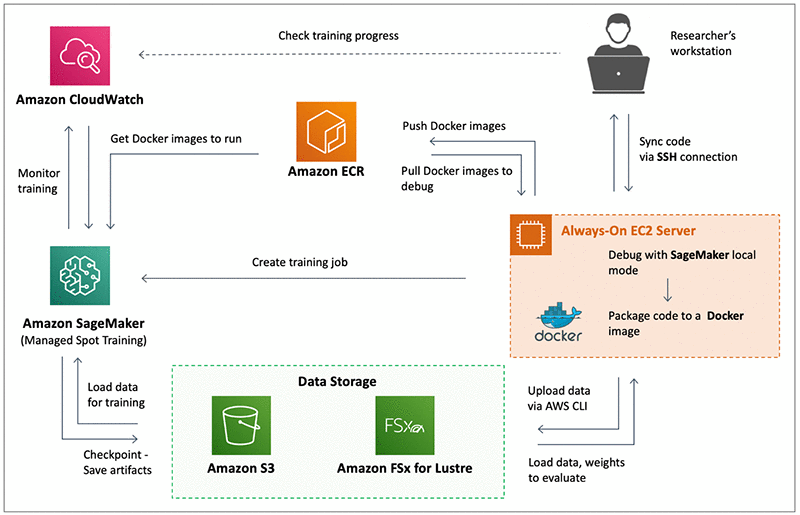
Cinnamon's AWS SageMaker Flow in 2020: How our training pipeline flows from local experimentation to SageMaker training
We didn't just want a tool; we needed a repeatable workflow. I architected a solution combining Docker for consistency, SageMaker for scale, and Neptune.ai for visibility.
Note
By adopting SageMaker Managed Spot Training, we reduced our training costs by 70%. You can read our detailed case study featured on the AWS Machine Learning Blog.
TBH, that 70% number is a bit of an exaggeration, but it's indeed significantly reduced our training costs.
1. The Adoption Hurdle: Overcoming the "Notebook Mentality"

Invest in ML Infrastructure, image credit: https://medium.com/@ashwinnaidu1991/unleashing-the-magic-of-mlflow-an-enchanting-guide-to-machine-learning-and-mlops-2a710592839
Honestly, the decision to adopt SageMaker was from upper IT management, and it gave us a hard time at the beginning. Many of our researchers were used to the freedom of Jupyter Notebooks and scripts on always-on EC2 instances. Suddenly, they had to deal with Docker images, S3 buckets, entry points, and cloud service know-how. It felt like unnecessary overhead.
Recognising the resistance, I advocated for a gradual rollout to soften the transition. We started with a small pilot to gauge interest and address concerns, then documented the process as a guideline and shared it with the team. This approach validated the solution, built trust and confidence across the organisation, and—most importantly—defused tensions between the AI and IT departments.
The "aha moment" came when we discovered the serverless nature of SageMaker, which allowed us to run multiple training jobs simultaneously rather than waiting for one to finish before scheduling the next. That's when the team realised the long-term benefit outweighed the initial steep learning curve.
Fun Fact
We escalated SageMaker Managed Spot Training to CI/CD to run report generation jobs and full-pipeline GPU integration tests. This is still the norm for the team even today.
2. Experiment Tracking as the Source of Truth
Like many ML researchers coming from academia, I started out tracking experiments in spreadsheets, and visualise them on local TensorBoard. It was sustainable at first, but as we scaled, it broke down. Models were scattered across personal machines and servers, and reproducing a specific run from two weeks ago became impossible.
Discovering Neptune.ai was a turning point. Suddenly, I could centralise experiment tracking, compare results instantly, and visualise metrics on a dashboard accessible from anywhere.
I proposed a team-wide rollout to Neptune.ai, and we adopted it to serve as our "source of truth", automating the logging of critical metadata that researchers previously overlooked:
- Hyperparameters
- Dataset versions and checksums
- Git commit hashes
- Training metrics and curves
- Model artifacts and checkpoints
- Hardware utilisation
The impact was immediate. By eliminating "shadow experiments"—tests that had already been run but weren't documented—we cut our compute costs by $6,000/month.
3. The "One-Click" Standardised Template
This was the core piece of the puzzle. We moved away from ad-hoc scripts to a unified training template. The key was flexibility: we didn't want to force everyone into a rigid framework (). Instead, we built a standardised interface* that adapted to the researcher's preferred tools.
- Universal Compatibility: Whether Layout/OCR/KV models, or PyTorch/TensorFlow, the template could be adapted seamlessly.
- Standardised Interface: We established a consistent API for model training. This abstraction managed the operational complexities—such as logging, checkpointing, and auto-resuming—enabling researchers to focus entirely on improving their models.
- Auto-Resuming: Integrated logic to handle Spot Instance interruptions automatically, saving costs without losing progress.
- Injection over inheritance: Instead of forcing researchers to inherit from a rigid
BaseTrainerclass, we built helper libraries they could simply 'plug in' to their existing scripts. This kept their code clean and the learning curve low.
(*) We experimented with public frameworks like pytorch-lightning, MLFlow, and IDSIA/sacred early on. However, we found them either too rigid or difficult to customize for our specific use cases. It felt like a detour to build our own thin wrapper instead of adopting an existing standard, but that upfront investment gave us the agility we needed in the long run.
Note
The "injection over inheritance" principle was particularly effective for our specific use cases (many models, multiple frameworks). However, the best approach depends on your specific needs. While early standardisation eases maintenance and expandability, be careful not to fall into the trap of over-engineering.
4. Version Everything: Code, Data, and Models
Not just code - datasets, checkpoints, configurations.
- Code: Git + strict branch protection. Obvious, but we finally enforced it.
- Data: Our in-house Data Platform (every image versioned) + Hugging Face Datasets with strict checksums.
- Models & checkpoints: Neptune.ai artifacts, Huggingface Models + our own versioning tag (
<module>-<project/purpose>-<semantic_version>). Every production release now has an immutable ID you can point to. - Configurations: Every checkpoint carries its full DNA: hyperparameters, dataset version, training environment specifications, and Git commit hash. Make sure model weights will always going with how to re-produce it.
- Environments: One golden Docker image per project and library, built from a locked
requirements.txtwith specific versions of dependencies.
Tip
Standardised Docker environments gave us reusable environments, though we learned the hard way that keeping Docker image sizes manageable is its own battle (multi-stage builds, CUDA/GPU drivers, .dockerignore, apt-cache purging, etc.)! But the benefits were undeniable:
- Reproducible training environments
- Easy onboarding for new team members
- Consistent behaviour across local and cloud
That single discipline — being able to recreate any production model with one command and a version tag — eliminated 90% of our late-night "but it worked last month!" fires.
5. The CI/CD Pipeline
We treated experiments like production code. Docker gave us reproducible environments, DVC and Neptune.ai artifacts gave us versioned models/datasets, and a CI/CD pipeline in GitHub Actions gave us automation glue.
- Linting & Testing: Standard code quality checks via GitHub Actions.
- Deployment: Once merged, Docker images are pushed to AWS ECR and dispatched for production deployment.
- Automatic Model Verification: Before any merge, we set up a pipeline to verify model checkpoints against a private test set. We checked not just for accuracy integrity, but also for speed performance to ensure no regressions.
- Tech Lead Validation: Automated metrics are great, but for production AI, human intuition is still vital. A Tech Lead reviews the accuracy and performance reports before clicking "Merge." It is a necessary safety net.
6. Monitoring What Matters
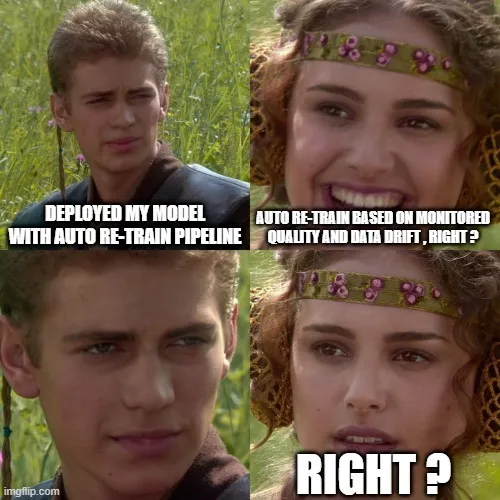
Data drift is inevitable, image credit: https://dev.to/aws-builders/mlops-journey-with-aws-part-1-helicopter-view-3gn1
"Data drift" is often too abstract. We focused on concrete verification that impacted user experience. We didn't just track "Accuracy: 95%." We tracked "Accuracy on Kanji Handwriting: 82%." This granular visibility allowed us to catch issues before deployment during our offline evaluation phase.
- Error Rates by Category: We broke down errors granularly. For example, on our OCR models, we tracked error rates specifically for handwriting, Latin, numbers, Hiragana/Katakana/Kanji characters, and strikeout text, .... This helped us pinpoint exactly where the model was struggling.
- Quality Control & Assurance: AI team closely worked with Quality Assurance (QA) team to ensure the models met the quality standards and catch any issues before and after deployment.
- Customer Feedback: Direct feedback loops from end-users were communicated clearly and transparently for the whole team. We stay in close contact with our customers to ensure we are always aware of any issues or areas for improvement.
Retraining Strategy:
We didn't believe in "continuous retraining" for the sake of it, or at least we have not reached that scale. Batch fine-tuning was triggered typically every 6 months after a round of human evaluation, or ad-hoc if we saw rising requests/complaints from multiple customers.
Cultural Changes
Technology fails if people don't use it. My focus as a leader was to make the "right way" the "easy way."
- Transparency by Default: We established a rule: If it's not in Neptune, it didn't happen. Research reports were required to link to Neptune.ai runs, fostering a culture where code reviews included hyperparameter reviews.
- Efficient Onboarding: By dockerizing our environment, we reduced new engineer setup time from 2 days to just 2 hours.
- Mentorship: This standardisation freed up seniors to mentor juniors on model architecture and ideation, rather than taking time to explain the ins and outs of the codebase.
Results
| Metric | Before | After | Impact |
|---|---|---|---|
| Monthly Cloud Cost | $60,000/month | $54,000/month | Saved $72k/year |
| Experiment Setup Time | 2 days | 2 hours | -92% (Productivity Boost) |
| Reproducibility Rate | ~40% | 95% | Reliable Validation |
| AI Effort Efficiency | Baseline | +40% | Increased Daily Experiments |
Note
Evolution Note: Success isn't static. While SageMaker was our bedrock in 2020, we later evolved this architecture to Kubeflow on GCP to further automate our training pipelines. The tools changed, but the core principle of 'standardised interfaces' remained. (Our Kubeflow adaptation is another long story, may be worth a future blog!)
Lessons Learned
- Templates over Policy: You cannot enforce MLOps with a wiki page. If the easiest way to start a project is using the 'compliant' template, people will be compliant by default.
- Visibility is a Powerful Nudge: When we put every experiment on a shared dashboard, the 'social pressure' of seeing wasteful runs did more for cost control than any strict budget policy could.
- Demonstrate Value Early: Showcasing the $6,000/month savings was crucial for getting leadership support to expand the platform.
- Cost Awareness Compounds: Cloud training costs add up fast. We reduced costs by using spot instances, right-sizing GPU instances, implementing early stopping, and caching preprocessed data.
- Tools Die, Abstractions Survive: We moved from SageMaker to Kubeflow, but it did not take us much effort to transition. Why? Because we standardised the interface, not just the tool. Invest in your abstraction layer early.
Final Thoughts
MLOps isn't glamorous, but it's what separates hobby projects from production systems. Invest in infrastructure early—your future self will thank you.
Credit: My drafts + Gemini 3 Pro for minor polishing + Nano Banana for cover image